Preview of: T224_2
Related educational resources
IntroductionComputers are designed to receive, store, manipulate and present data. This unit explains how computers do this, with reference
to the examples of a PC, kitchen scales and a digital camera. In particular...
1 Representing data in computers: introductionA computer is designed to do the following things:
receive data from the outside world;
store that data;
manipulate that data, probably creating and storing more data while doing so;
present...
2 Representing data in the kitchen scales
2.1 Introduction
Study note: You may like to click on the link below to the Numeracy Resource as you study Section 2. It offers additional
explanations and extra practice on some of the topics, and you may find...
2.2 Representing numbers: positive integersA very straightforward way of finding binary codes to represent positive integers is simply to use the binary number that
corresponds to each integer. This is because every positive integer in the everyday...
2 Representing data in the kitchen scales
2.2.1 Positve integers: denary numbersThe number system which we all use in everyday life is called the denary representation, or sometimes the decimal representation,
of numbers. In this system, the ten digits 0 to 9 are used, either singly...
2.2.2 Positve integers: binary numbersJust as a denary number system uses ten different digits (0, 1, 2, 3, … 9), a binary number system uses two (0, 1).What does
the 4-bit binary number 1010 represent? To what denary number is it equal? What...
2.2.3 Positve integers: converting denary numbers to binaryIf computers encode the denary numbers of the everyday world as binary numbers, then clearly there needs to be conversion
from denary to binary and vice versa. You have just seen how to convert binary...
2.2.4 Positve integers: encoding larger integersThe examples and activities in this section have looked only at 8-bit numbers. They have illustrated all of the principles
of encoding positive integers as binary numbers without introducing the complication...
2.3 Representing numbers: fractionsIn the denary system, a decimal point can be used to represent fractions, as in 6.5 or 24.29. One way of encoding fractions
uses an exactly analogous method in binary numbers: a ‘binary point’ is inserted.0.0010110110.011010101110.1Another...
2.4 Representing numbers: negative integersIn Section 2.2. I showed you how integers can be encoded if they are known to be positive, treating the integers in the kitchen
scales as if they were known to be positive. However, if the user invokes...
2.5 Representing weightsA physical quantity such as weight has the property that it can take on any value, not just a finite set of values. For instance,
at one time the ingredients in the scalepan could weigh 29.2569427 grams,...
2.6 Representing true/false quantitiesSometimes a quantity that is to be represented in a computer has only two possible values, either true or false. An example
of such a true/false quantity in the kitchen scales is the one that represents...
2.7 Input and output considerationsSo far in Section 2 I have focused on how the data is represented, or encoded, inside the weighing-scales computer. But how
does it get into the computer? And how does it get out again in a form that users...
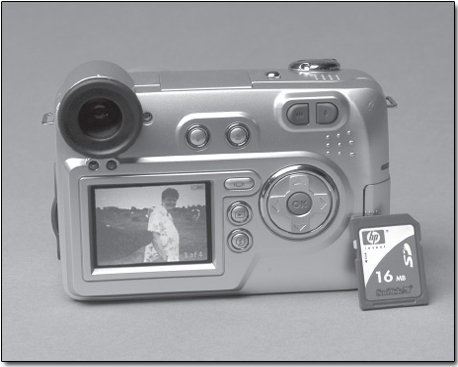
3 Representing data in the digital camera
3.1 IntroductionDigital cameras need to represent still pictures digitally, and this means that I need to introduce you to how still images
are represented. I shall do this in Section 3.2.
3.2 Representing still imagesThere are two basic methods of representing still images in a computer: bit maps (also sometimes called raster graphics or
raster images) and vector graphics (also sometimes called geometrical-shape graphics...
3.3 CompressionThe previous section mentioned the large file size of bit-map representations of even small pictures. Therefore just a few
images use up a great deal of storage space. This can be inconvenient for PC users,...
3.4 Input and output considerationsCCDs are not inherently able to detect colour, only brightness. So it is necessary to rely on the fact that any colour of
light can be made up from the three primary colours of light: red, blue and green....
4 Representing data in the PC
4.1 IntroductionPersonal computers, or PCs, are very versatile computers and can perform a huge range of tasks. So whereas the uses of the
kitchen scales and the digital camera indicate clearly what types of data are...
4.2 Representing text
Study note: You will need to refer to the Reference Manual while you are working through this section.Text can be represented
in a computer by a succession of binary codes, with each code representing...
4.3 Representing moving imagesA moving image is simply a series of still images presented at sufficiently short time intervals that the eye smoothes over
the change from one image to the next. In practice, this means the images must...
4.4 Representing soundSound, such as speech or music, is an analogue physical quantity that varies with time, and so the ideas you have already
met in Section 2.5 about converting analogue weights to digital form are relevant...
4.5 Input and output considerationsIn this final portion of Section 4, I shall look in outline at how text, moving pictures and sound can be input into a PC
and output from it. I'll leave aside the possibility that the data has been obtained...
5 Representing data in computers: conclusion
Study note: You will need to refer to the Reference Manual while you are working through this section.There is one very
important type of data that I need to introduce before I leave this topic...
6 Manipulating data in computers: introduction
Sections 1 to 5 of this unit have shown that in a computer all types of data are represented by binary codes, and that
programmers must make sure that the programs they write treat this data appropriately...
7 Binary arithmetic
7.1 Adding unsigned integers
Study note: You may like to have the Numeracy Resource (attached below) to hand as you study Section 7. It offers extra
practice with the manipulations, and you may find this useful.Pairs of binary...
7.2 Adding 2's complement integersThe leftmost bit at the start of a 2's complement integer (which represents the presence or absence of the weighting −128)
is treated in just the same way as all the other bits in the integers. So the...
7.3 Subtracting 2's complement integersYou will probably have carried out subtraction of denary numbers using rules for subtraction that include the process of ‘borrowing’
whenever you need to subtract a larger digit from a smaller one. It...
7.4 Multiplying 2's complement integersMultiplication can be thought of as repeated addition. For instance, in denary arithmeticPerform the binary multiplication
0010 1000 × 11 by adding 0010 1000 to itself the appropriate number of times.Perform...
7.5 Dividing 2's complement integersJust as multiplication can be turned into repeated additions, so division can be turned into repeated subtractions. And just
as shifting a binary integer one place to the left equates to multiplying by...
7.6 Arithmetic with binary fractionsMy final point in the preceding section brings home the fact that integer arithmetic is not really suitable when divisions
are to be performed. It is also not suitable where some or all of the values involved...
8 Logic operations
8.1 Introduction
Study note: You may like to have the Numeracy Resource to hand as you study Section 15. It offers extra practice with
the logic operations, and you may find this useful.In this section I shall briefly...
8.2 The NOT operationThe NOT operation (note that, as with all logic operators, NOT is always written in capital letters) acts bit by bit on a
single binary word according the following rules:
8.3 The AND operationThe AND operation combines two binary words bit by bit according to the rules0 AND 0 = 00 AND 1 = 01 AND 0 = 01 AND 1 = 1Find
the result of 1101 1011 AND 1011 1010.
8.4 The OR operationThe OR operation (occasionally called the inclusive-OR operation to distinguish it more clearly from the exclusive-OR operation
which I shall be introducing shortly) combines binary words bit by bit according...
8.5 The exclusive-OR operationThe exclusive-OR operation (usually abbreviated to XOR, pronounced ‘ex-or’) combines two binary words, bit by bit, according
to the rules:0 XOR 0 = 00 XOR 1 = 11 XOR 0 = 11 XOR 1 = 0Find the result of...
8.6 SummaryThe logic operations introduced here are summarised in Table 1, which is an example of what is known as a ‘truth table’. It
shows what the result (‘output’) of each logic operation is for all possible...
9 ConclusionThis unit started with the idea that computers have become an important part of everyday life, especially when all the ‘invisible’
computers that surround us are taken into account – those embedded in...
Acknowledgements
|