Study note: You may like to click on the link below to the Numeracy Resource as you study Section 2. It offers additional
explanations and extra practice on some of the topics, and you may find this useful.
Click on the 'View document' link below to open the Numeracy Resource.
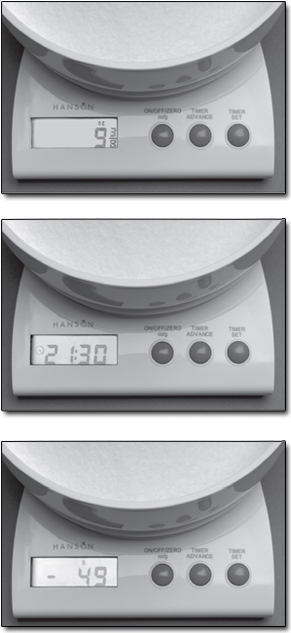
Figure 1: Three photos of the kitchen scales’ display: (top) with the scales weighing in imperial units; (middle) with the timer function
in operation; (bottom) negative values can be displayed for weights if the add-and-weigh facility is being used
The kitchen scales above provide examples of several different types of data that need to be represented.
I'll start with an output: the display panel on the front of the scales. This can display numbers: integer (whole) numbers
of grams; numbers of ounces including fractions; even negative numbers when the add-and-weigh facility is in use. In Sections 2.2 to 2.4 I shall discuss how integer numbers which are positive, fractions and negative numbers respectively can be represented inside
the computer.
So far as the inputs to the computer are concerned, the most important one is the weight in the scalepan. You may think that
representing a weight inside a computer is simply a matter of representing a number, and to some extent you would be right.
But there is a complication, which I'll explain in Section 2.5.
Next I'll deal with the input that controls whether the scales are to weigh in metric or imperial units and the output that
controls whether the beeper that's used in the timer function is on or off. Representing both of these needs a true/false
quantity, as I'll explain in Section 2.6.
All of the above deal with the codes that are used to represent the data. I'll conclude Section 2 with a brief look (Section 2.7) at the ways in which input and output are handled so that the computer can obtain the data it uses, and subsequently present
the user with appropriate data.