hts.StevenWood.com

Karel 15e

Home ] Up ] Karel 15 ] Karel 15a ] Karel 15b ] Karel 15c ] Karel 15d ][ Karel 15e ] Boolean Logic ] CheckList ] Rubric ][ Last Page ]

Karel 15e

Complete the following in class or for homework. Do NOT hand in your work unless other instructions were given.

1.

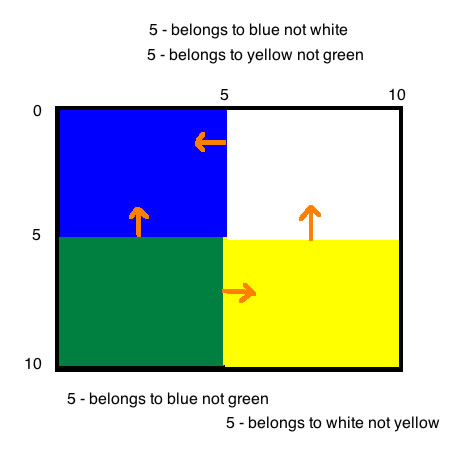
Create a CameleonBot that will change colour based on the location of the robot in the city. The colour is based on the diagram to the right.

CameleonBot is a child of Robot.

Examine the Robot  documentation to find out how to determine the current street and avenue of the robot.

Test your robot by moving your robot around the four areas.

Your robot should start with the proper colour when placed in the city too.

ALSO adjust the robot so that it will NOT move pass street 0, street 10, avenue 0 and avenue 10.

 
Home ] Up ] Karel 15 ] Karel 15a ] Karel 15b ] Karel 15c ] Karel 15d ][ Karel 15e ]Boolean Logic ] CheckList ] Rubric ][Last Page]
All material on this site is copyright © 1997- by Steven Wood or as credited. All right reserved. Use of this site indicates you agreement with the  terms of use.
Send comments or questions to about this page.
Every attempt has been made to credit work under copyright. If there are any claims that copyright has been missed please contact the .
+SDG+