Commonly used Math class methods
Method prototype |
Description | Example |
| double abs ( double x ) long abs ( long x ) int abs ( int x ) |
absolute value of x (also version for float values) |
if x > 0 then abs ( x ) = x if x = 0 then abs ( x ) = 0 if x < = then abs ( x ) = -x |
| double cos ( double x ) | trigonometric sine of x (x is in radians: to convert degrees to radians use toRadians() ) | cos ( 0.0 ) = 1.0 |
| double ceil ( double x ) | rounds x to the smallest integer-like double not less than x | ceil ( 9.2 ) = 10.0 ceil ( - 9.7 ) = -9.0 |
| double floor ( double x ) | rounds x to the largest integer-like double not greater than x | floor ( 9.2 ) = 9.0 floor ( -9.7 ) = -10.0 |
| int max ( int x, int y ) long max ( long x, long y) |
larger value of x and y (also version for float values) |
max ( 2.3, 12.8 ) = 12.8 max ( -2.4, -11.7) = -2.4 |
| int min ( int x, int y ) long min ( long x, long y ) |
smaller value of x and y (also version for float values) |
min ( 2.3, 12.8 ) = 2.3 min ( -2.4, -11.7 ) = -11.7 |
| double pow ( double x, double y ) | x raised to power y (xy) | pow ( 2.0, 5 ) = 32 pow ( 16, 0.5 ) = 4 |
| double random ( ) | double value x such that x is greater than or equal to 0.0
and less than 1.0 ( 0.0 <= x < 1.0 ) |
random ( ) = 0.9874592.. |
| long round( double x ) | closest long to x | round ( 4.3 ) = 4 round ( -9.7 ) = -10 |
| double sin ( double x) | trigonometric sine of x (x is in radians: to convert degrees to radians use toRadians() ) | sin ( 0.0 ) = 0.0 |
| double sqrt ( double x ) | square root of x | sqrt ( 16.0 ) = 4 sqrt ( 2.0 ) = 1.14142... |
| double tan ( double x ) | trigonometric cosine of x (x is in radians: to convert degrees to radians use toRadians() ) | tan ( 0.0 ) = 0.0 |
| double toRadians (double x) | Converts an angle, x, measured in degrees to the equivalent angle measured in radians. | toRadians ( 0. 0 ) = 0.0 toRadians ( 90.0 ) = 1.570.. toRadians ( 180.0 ) = 3.14.. |
| PI | not a method but a constant (or field as called in Java) | 3.14159265358... |
| Note: to use any of these you need to use the format Math.PI, Math.sin(x), etc. | ||
How do I use a method prototype?
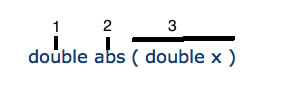
tells you several things about the method.
- double - this is the type of answer that you will get when you use the method, it is often called the return type. E.g. If I ask you the question, "What is 3.5 + 2?" you will tell me, "5.5". The answer you give back is of type double (number with decimals). You do NOT write it in your code.
- abs - this is the name of the method. To use it, you must type in Math.abs. (The "Math." part is required for ALL Math class methods.
- ( double x ) - this tells the number and type of parameters (variables or numbers) that are required to make the method work. In this case, one parameter is needed and it must be of type double (number with decimals). You do NOT write it in your code, you use your variable NAME(s) instead.
Using the method in your code:
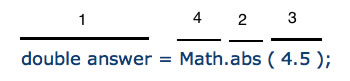
- Create a variable of the return type indicated in the prototype.
- Use the method name (see #4)
- Supply the correct number and TYPE of parameters.
- Add Math. to use the method is an actual program.
Source: Deitel, H.M. and Deitel P.J. Java: How to Program. 3rd ed. Upper Saddle River, New Jersey. Prentice Hall.1999. ISBN 0-13-012507-5, p 206. Adapted.