Computer Components Activity
What to Hand In
Type the following questions into a Google document. Answer the questions about the computer on which you are working. For each question, you must include a screenshot showing where you found the information, and answer each of the follow up questions. All screenshots must be included in the document images that are at MOST 3.5 inches high AND easily readable.
All questions, answers, and screen shots should be included in a single document. Save the document as:
ICS3U - <first name last name> - Hardware
Hint:
| You may want to click on the open apple in the top left corner and select "About This Mac" to find the information about your computer. | For some of these questions you should also click the "System Report" button in About This Mac. |
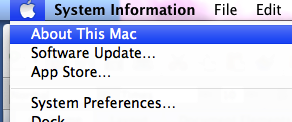 |
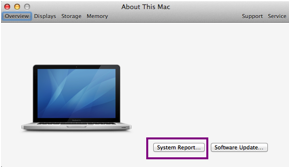 |
Questions:
- What CPU(s) is (are) installed in your machine? (e.g. Pentium 4 2.80 GHz)
- What is a CPU and explain why is it important to the computer.
- Why does the description of the CPU include GHz?
- How does (do) the CPU(s) on your computer compare to one you might find on a new computer?
- Name one other person in the class that has a different CPU in their machine. Give the type of computer and the name of the CPU that they have installed.
- How much memory is installed in your machine? (e.g. 256 MB RAM)
- What is the purpose of the RAM that is installed in the computer?
- What are some of the characteristics of this type of memory?
- There are other types of memory on your computer called "cache". What type(s) and amount(s) of cache does your computer have? What is the purpose of this memory?
- What is the size of the hard disk and how much space is free? (e.g. 260.0 GB Hard Disk, 10.8 GB free)
- Is your hard drive solid-state? If not, what type is it? What is the difference?
- What is the breakdown of your use of the hard disk:
Audio? Movies? Photos? Apps? Backups? Other? - Some people wisely use external storage devices to backup their computer. Some have a hardware device and others use an on-line solution. Do you have an external storage source? What is it? How often do you use it? What is the cost?
- Find one hardware solution to backing up your computer AND one on-line solution. Describe each and give the costs to use them. What are the pros and cons of each system?
- What type of screen does your computer have? What is the screen size and area, and graphics system? (e.g. type: LCD, screen size: 11 inches screen area: 1280 by 960 pixels, graphics system: QNZ HD 123 128 MB)
- What does the screen resolution tell you about your display?
- How do they get the size of the screen?
- Your screen is probably built-in. What if you had an external monitor connected to your computer? Give two types of monitors you could connect to your computer. What are the advantages/disadvantages of each? Give cost and how you would connect it to your computer (e.g. what type of cable is needed, etc.)
- What operating system does your computer use? (e.g. OS X 10.6.4)
- There are at least 3 main operating systems used on personal computers. List the "Big 3". You may wish to examine this web page for one view: Usage share of operating systems
- What are 3 benefits / drawbacks for each? Here are two articles to get you thinking about this: Eight Reasons Your Next Computer Should Be a Mac and Eight Reasons Your Next Computer Should Be a PC. Both these articles are from 2009, but you will get the idea.
- "Everyone" in HTS is using an Apple product? What are your thoughts on this as being the best product? Support your answer with facts. No flames please.
- Is it easy to get exact numbers of users for each operating system? Why or why not?
- Thunderbolt and USB are different types of busses. What is a bus on a computer?
- What busses does your computer have? (Give at least 3 types.)
- What items can be attached to your computer by these busses?
- Give at least two reasons why computers have so many different types of busses.